Mechanics and workflow
Gothic 1 Remake Lockpicking Guide
A practical method for reading linked plates, avoiding edge traps, and turning observations into a reliable solution.
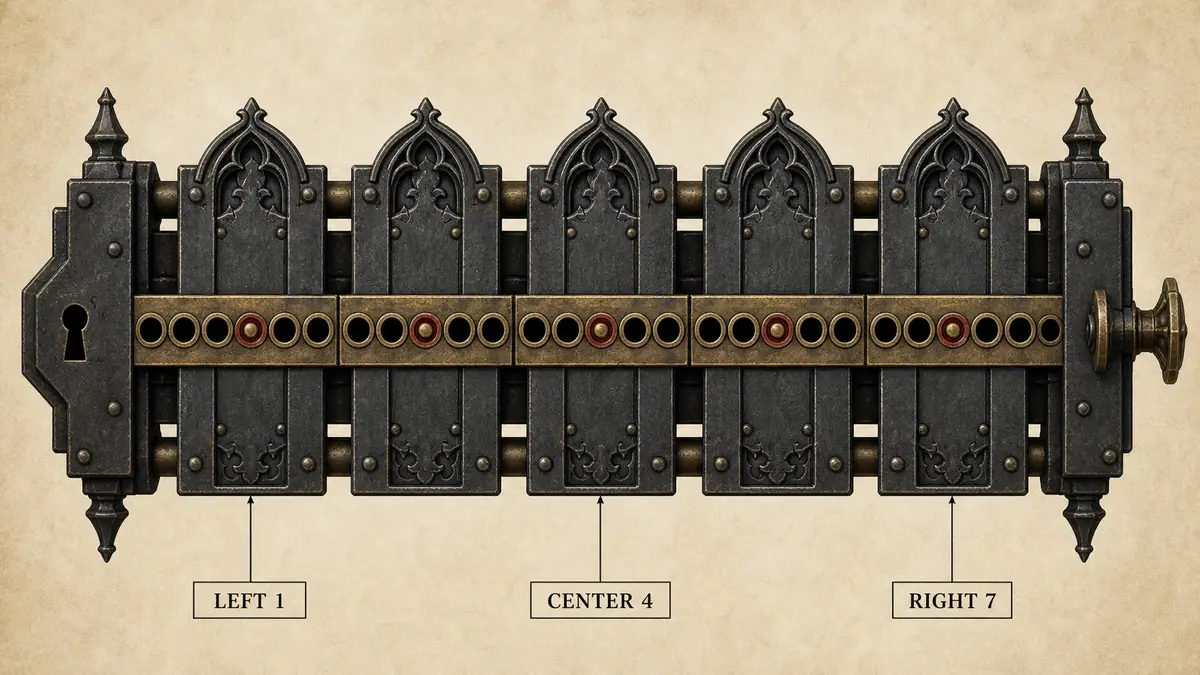
The lock in one minute
In Gothic 1 Remake, the lock view presents several plates on seven-position tracks. Your A and D inputs move the selected plate left or right. Some plates also influence other plates. An affected plate may move in the same direction, move in the opposite direction, or remain still. The lock opens when every plate reaches its center position without any movement forcing a linked plate beyond an edge.
This means you are solving a small state machine, not memorizing a simple key string. The useful information is the current position of every plate and the directional reaction caused by each active plate. Once those facts are recorded, a browser solver can search the legal states; without them, repeated guesses quickly become hard to reconstruct.
Step 1: establish a consistent numbering system
Number plate tracks from back to front, with plate 1 at the back and the highest plate number at the front. Number holes 1 through 7 from left to right. Hole 4 is the center target. Write the complete initial state as a short vector such as 2-6-3-5-1. Consistency matters more than the physical names: never swap the order halfway through a test.
Step 2: observe one controlled movement
Select one plate, press A or D exactly once, and compare every plate with the state immediately before that input. If another plate shifts by one hole in the same direction, record Same. If it shifts by one hole in the reverse direction, record Opposite. If it stays in place, record None. Do not infer the reverse connection. The mechanism can be directional, so row 2 column 4 and row 4 column 2 are separate facts.
| Observed reaction | Matrix value | Meaning |
|---|---|---|
| Moves with active plate | Same | Both positions change by +1 or -1 |
| Moves against active plate | Opposite | One changes by +1 while the other changes by -1 |
| Does not move | None | No link was observed for this direction |
Step 3: protect the baseline
A clean observation compares two states separated by one input. If you make three exploratory moves and then enter only the last result, you may attribute earlier changes to the wrong plate. Return to a known baseline when possible. Otherwise, update the full starting vector and treat the next input as a fresh experiment.
Edges require extra care. A relationship may be difficult to observe when a linked plate is already at hole 1 or hole 7, because the attempted movement can be illegal. Move to a safer baseline or test the opposite direction rather than recording None from a blocked experiment.
Step 4: enter the current state, not the original state
After testing, the chest may no longer match the position vector you first wrote down. Before solving, verify every plate in-game and update the tool. A mathematically valid route for an old state will diverge on the first or second key. This site clears the displayed result whenever any input changes for exactly that reason.
How the solver finds a route
The solver encodes all plate positions into one state. From that state it tries moving every plate left and right, applies all Same and Opposite relationships, and rejects a move if any resulting position falls outside 1–7. It then explores the next layer of legal states. Because breadth-first search examines all routes of length one before length two, the first target route uses the fewest A/D plate movements.
The displayed R/W/S/A/D chain adds cursor navigation afterward. R resets selection to the front plate, W moves toward lower plate numbers, S moves toward higher plate numbers, and A/D shifts the active plate. A shortest plate route can contain slightly more W/S navigation than another route; follow the chain exactly and compare the on-screen state after each grouped step.
Common failure patterns
The solution moves the wrong plate
Check the back-to-front numbering convention and the meaning of W/S. Plate numbering mistakes affect every following input.
A linked plate moves the wrong way
Reverse the relevant Same/Opposite entry only after repeating a controlled test. Left and right screen orientation can feel inverted depending on how you describe the lock.
The solver says no solution
First verify current positions and directional links. Then look for edge traps: a necessary active move may also push a linked plate beyond hole 1 or 7. A no-route result is possible under the entered model.
The route worked until another manual test
Any extra game input changes the state. Re-enter all current positions and solve again rather than continuing an old chain.
A repeatable field checklist
- Count plates and number them back to front.
- Record holes left to right as 1–7.
- Test one plate with one key.
- Record Same, Opposite, or None for every reaction.
- Repeat from a known state.
- Verify the live positions.
- Calculate and follow the route in groups.
- Stop if the expected state differs from the chest.
For a new lock, open the Gothic lockpick solver in Guided mode. For a written mechanism, switch to Expert matrix. The solutions page provides sample notation you can use to check your understanding.
Gothic Remake lockpicking FAQ
How does lockpicking work in Gothic 1 Remake?
You move selected plates along seven-hole tracks. Some active plates move other plates in the same or opposite direction, and all plates must reach the center.
How should I number the plates?
Use one consistent order. This site numbers plate 1 at the back and the highest plate at the front.
Why is a one-move test important?
It isolates cause and effect, letting you attribute every observed reaction to one active plate and direction.
Can a relationship be one-way?
Yes. Treat every row-to-column link as directional until a reverse test proves otherwise.
What is an edge trap?
It occurs when a desired move would also force a linked plate below hole 1 or above hole 7, making that move illegal.
Does the shortest solution use the fewest keyboard presses?
It minimizes A/D plate moves. W/S cursor navigation is generated after the route and may not be globally minimal.